

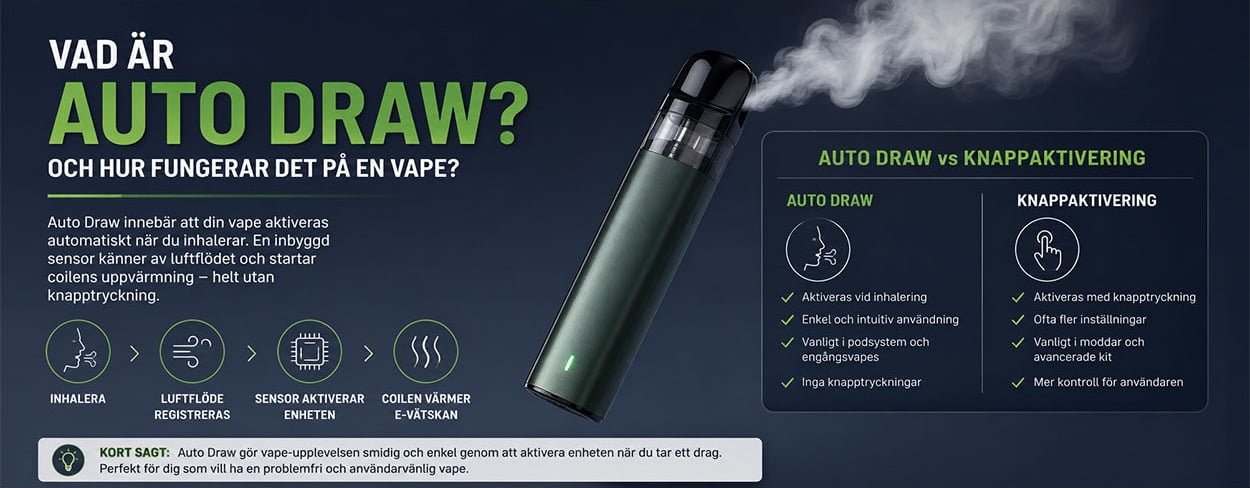
Auto Draw is draw activation: a sensor detects an inhalation-related signal and the control circuit supplies power to the coil’s heating element. The function describes how a vape is activated, not how wattage, airflow or charging is regulated.
Auto Draw and other names for draw activation
Auto Draw, Draw Activated, Draw Activation, Inhalation Activated and inhalation-activated are used for activation via an inhalation-related signal. A model may have draw activation only or combine it with an activation button.
When the signal ceases, the electronics switch off the power to the heating element. The element then cools down.
How does Auto Draw work technically?
A pressure sensor or other intended sensor design detects the change that occurs when air is drawn through the mouthpiece. The control circuit uses the signal to switch on the power from the battery to the heating element. A simplified functional sequence is:
- Air is drawn through the mouthpiece.
- Airflow and pressure conditions change.
- The sensor provides an activation signal.
- The control circuit supplies power from the battery to the heating element.
- The element heats liquid at the wetted wick and contributes to aerosol formation.
- Power supply stops when the activation condition ceases or the model’s protection interrupts it.
Which vape products use Auto Draw?
Draw activation occurs in various product formats. Aspire Gotek S explicitly supports Auto Draw. Aspire Flexus Pro has modes A for draw activation, B for button activation and AB for both.
- Disposable vapes may have draw activation in a sealed construction.
- Pre-filled pod systems have a separate intended pod; the activation method belongs to the device model.
- Starter kits for e-cigarettes may contain rechargeable devices with different activation methods.
Pre-filling, rechargeability and activation method are separate properties. A button may be intended for settings without being an activation button.
Auto Draw compared with button activation
The difference is which signal starts the power supply to the heating element. Power and airflow settings are determined separately:
| Function | Auto Draw | Button activation |
|---|---|---|
| Activation | Starts via an inhalation-related signal. | Starts via an intended activation button. |
| Product form | Occurs in pod systems and sealed disposable formats. | Occurs in mods and pod systems, for example Flexus Pro in B mode. |
| Settings | Original Klypse has no buttons or settings; Flexus Pro has power and airflow controls. | Button activation does not automatically mean that all settings can be changed. |
| Usage signal | Sensor detection from airflow or pressure. | Button signal to the control circuit. |
Flexus Pro has both sensor and button activation in the same device.
Can Auto Draw affect the draw feel?
The design of the airflow path affects draw resistance and the signal detected by the sensor. The mouthpiece, air channels, coil and airflow control are parts of the construction. A tight, open or blocked airflow path can affect whether and when activation is detected, depending on the model.
Condensation can affect the airflow path. Do not use harder or repeated draws to force activation.
Can Auto Draw stop working?
Yes. Possible causes of failed activation include:
- Low battery charge.
- Blocked airflow path.
- Condensation or liquid in the air channel.
- Suspected liquid near the sensor or electronics.
- Incorrectly positioned or incompatible pod.
- Technical fault in the sensor or control circuit.
A switched-off mode or lock can also prevent activation. Flexus Pro uses button activation only in B mode.
In the event of unintentional activation, abnormal heat, damage, swelling or suspected liquid in the electronics, both use and charging must be stopped. Do not test-charge or test-activate the device to see whether the fault disappears. A sealed disposable device must not be opened for repair.
Auto Draw and safety functions
A timeout can limit individual activation according to the model’s conditions. According to the product specification, the original Innokin Klypse has a 10-second timeout. The Flexus Pro manual states that activation lasting over 7 seconds displays the message “Over 7S” and locks the device. The information describes protection conditions, not recommended activation times.
On the Geekvape Digi Max, Auto Draw also works when the lock switch is used. A lock can therefore apply to the buttons without disabling draw activation.
Do not attempt to bypass a protection cutoff. In the event of damage or unintentional activation, discontinue use of the device.
Auto Draw on disposable vapes
In a sealed disposable construction, the liquid, coil and battery section are integrated, and draw activation may be included. The disposable format does not, however, indicate whether the battery is rechargeable.
Innokin Innobar 6000 is a manufacturer example of a rechargeable disposable format. Only charge a construction intended for charging, using the intended equipment. Charging does not restore consumed liquid or burnt cotton. Sealed devices must not be opened for filling or battery replacement; when the liquid or the battery of a non-rechargeable device is depleted, it must not be used further.
What should be checked if Auto Draw does not respond?
Checking begins with the intended status and accessible parts, without taking a test draw. Disconnect the charging cable, switch off the device where the model has a power-off function and let the device cool before handling it. Do not open the battery section or sensor.
- Battery: read an already visible charging indicator. Only charge undamaged equipment intended for charging.
- Pod: only an intended compatible removable pod should be handled. Parts with an incorrect fit must not be forced into place.
- Airflow path: keep only the intended accessible openings clear. Do not blow through the sensor, poke into internal channels or cover air or sensor openings to alter the function.
- Contact surfaces: wipe accessible pod exteriors and contacts with a dry soft cloth. For Innokin Sceptre, dry cleaning of the connection is specified. Do not rinse the electronics or bend or scrape the contact pins.
- Mode and lock: Flexus Pro has A, B and AB modes as well as a separate timeout lock at Over 7S. Digi Max retains draw activation under the lock switch.
Display texts are also model-specific. “Low Battery” on Flexus Pro is a battery status message, while “Over 7S” refers to timeout and locking. According to the manual, three button presses open the wattage setting, not a general button lock. The messages must not be used to reset or test-activate a damaged device.
In the event of recurring functional faults, discontinue use. Suspected liquid in the electronics, self-activation or damage also requires charging to be stopped. If the taste is dry or burnt, stop activation; burnt cotton cannot be restored by refilling or increasing the power.
Quick Facts
- Reading Time
- 6 min
- Popularity
- Very Popular
- Category
- Vape
- Published
- 2026-07-02
Related Products
Products mentioned in this article


